The choice between 3 Axis, 4 Axis or 5 Axis CNC machining depends on the geometry of your part, the tolerance requirements and your budget.
Are you a manufacturing engineer, a product designer, or someone managing a machining project?
Either way, I am guessing you are here because you cannot decide between 3-axis, 4-axis, and 5-axis machining. More specifically, you want to know how to get your part done at the lowest possible cost.
Good news. You are in the right place. That is exactly what this article is here to help you figure out.
What Is 3-Axis CNC Machining?
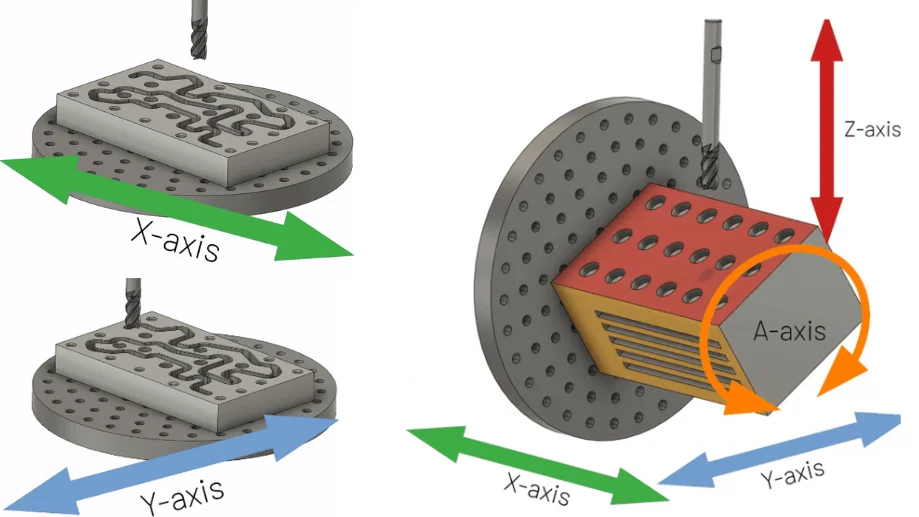
3-axis CNC machining moves the cutting tool along three linear axes: X, Y, and Z. The workpiece stays fixed throughout the operation.
It is the most common and affordable form of CNC milling. It works well for flat surfaces, drilled holes, slots, and basic profiles.
Capabilities
Machines flat surfaces, drilled holes, slots, and basic profiles
Simple and fast to set up
Low programming complexity
Most affordable option for straightforward parts
Limitations
Tool can only reach one face per setup
Multiple setups required for multi-sided parts
Cannot cut compound angles or undercuts without special tooling
4-axis machining adds the A-axis, which rotates the workpiece around X. This allows the tool to cut multiple sides without manual repositioning.
There are two modes: indexing (part rotates to a fixed angle, then cutting begins) and continuous (part rotates and tool cuts simultaneously).
Capabilities
Machines multiple faces in a single setup
Two modes: indexing and continuous rotation
Handles helical grooves, cam profiles, and circumferential features
Better tolerance consistency across multiple faces than 3-axis
Limitations
Only one rotary axis
Cannot handle compound angles or complex curved surfaces
Higher programming complexity than 3-axis
Higher machine cost than 3-axis
Typical Applications
Cylindrical parts and shafts
Multi-sided housings
Engraved rollers
Cam profiles
What Is 5-Axis CNC Machining?
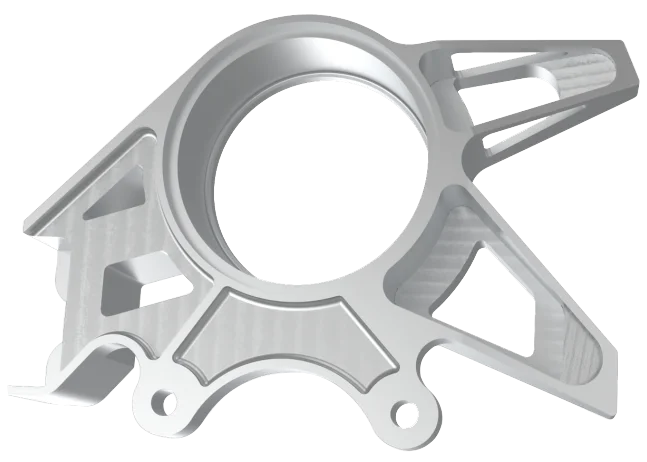
5-axis machining adds two rotary axes to the standard X, Y, Z setup. The tool can approach the workpiece from almost any angle in a single setup.
Two types exist: 3+2 mode (rotary axes lock at a fixed angle, then 3-axis cutting begins) and simultaneous mode (all five axes move together during cutting).
Capabilities
Machines up to five sides in a single setup
Two types: 3+2 mode and simultaneous 5-axis mode
Delivers tightest tolerances and best surface finish
Significantly reduces lead time for complex parts
Limitations
Highest machine cost and hourly rate
Most complex programming
Requires skilled operators
Not cost-effective for simple geometry
Typical Applications
Turbine blades and impellers
Aerospace structural components
Medical implants and surgical instruments
Complex mold cavities
What Are Difference Between 3-Axis, 4-Aixs and 5-Axis CNC Machining?
Not sure which axis configuration fits your project? This table gives you the answer at a glance.
3-Axis
4-Axis
5-Axis
Part complexity
Simple to moderate
Moderate to complex
High complexity
Number of setups
Multiple
1 to 2
Usually 1
Tolerance capability
Standard
Standard to tight
Tight to ultra-tight
Surface finish
Good
Good to very good
Excellent
Programming complexity
Low
Medium
High
Operator skill level
Entry-level
Intermediate
Advanced
Operational risk
Low
Moderate
Higher
Maintenance cost
Low
Low to moderate
High
Machine cost
Low
Medium
High
Common users
Manufacturers, job shops
Engineers needing multi-side access
Aerospace, medical, defense teams
3-Axis vs 4-Axis: When Does the Extra Rotation Actually Matter?
The short answer: when your part has features on more than one face.
A 3-axis machine can only cut one face per setup. If your part has holes, slots, or profiles on multiple sides, the operator has to stop, reposition, and reclamp. Every repositioning introduces a small alignment error. On tight-tolerance parts, those errors add up.
A 4-axis machine eliminates most of that. The A-axis rotates the workpiece, giving the tool access to multiple faces in a single setup. No manual repositioning. No accumulated alignment error.
This matters most for cylindrical parts, parts with circumferential features, and components that need consistent tolerances across multiple faces. Cam profiles, engraved rollers, and multi-sided housings are typical examples.
4-Axis vs 5-Axis: Is the Cost Jump Worth It?
Sometimes. It depends entirely on your part geometry.
A 4-axis machine rotates on one axis. That covers most cylindrical parts and multi-sided components. But it cannot handle compound angles, complex curves, or surfaces that require the tool to approach from two rotational directions simultaneously.
That is where 5-axis comes in. With two rotary axes, the machine can reach almost any surface in a single setup. The tool stays at the optimal angle throughout the cut, which improves surface finish and reduces tool wear.
3-Axis vs 5-Axis: The Biggest Performance Gap
Of all three comparisons, this one has the widest gap.
A 3-axis machine works well for simple parts. But it has a hard limit: the tool can only approach from one direction per setup. Complex geometry, angled features, and tight tolerances across multiple faces all require manual repositioning. That takes time and introduces error.
A 5-axis machine removes almost all of those constraints. The tool can reach five sides of a part in a single setup, approach from nearly any angle, and maintain consistent tolerances throughout. There is no manual repositioning, no accumulated error, and no need for special fixtures.
How to Choose the Right Axis for Your Project
Start with your part geometry. That single factor eliminates most of the confusion.
Choose 3-axis if:
Your part has simple geometry with no angled features
Machining is only needed on one or two faces
Budget is the primary constraint
You are producing flat parts, brackets, enclosures, or basic profiles
Choose 4-axis if:
Your part has features on multiple faces or around a circumference
You need consistent tolerances across different faces without manual repositioning
Your part includes helical grooves, cam profiles, or cylindrical features
You want fewer setups than 3-axis without paying for full 5-axis capability
Choose 5-axis if:
Your part has compound angles, undercuts, or complex curved surfaces
You need the tightest possible tolerances in a single setup
Your industry demands it: aerospace, medical, defense, or complex mold work
Not always. 5-axis delivers better precision and surface finish for complex parts. But for simple geometry, it adds cost without adding value. Match the machine to your part, not the other way around.
In some cases, yes. Adding a rotary table to a 3-axis machine can give it 4-axis capability. Full 5-axis capability typically requires a dedicated machine. Check with your machine manufacturer before assuming an upgrade is possible.
In 3+2 machining, the two rotary axes position the part at a fixed angle, then cutting happens using standard 3-axis motion. In full 5-axis machining, all five axes move simultaneously during cutting. Full 5-axis is better for smooth curves and organic surfaces. 3+2 is simpler to program and sufficient for most angled features.
Most aerospace components require 5-axis machining. Turbine blades, impellers, and structural brackets typically have complex geometry and tight tolerances that only 5-axis can deliver consistently.
Not necessarily. A part that requires four 3-axis setups may cost more than the same part machined in one 5-axis setup. More axes means higher machine rates, but fewer setups can offset that. Always compare total cost, not just hourly rate.
Look at your geometry. If your part has compound angles, undercuts, or complex curved surfaces that cannot be reached from a single direction, 5-axis is likely necessary. When in doubt, share your drawing with a machinist for an assessment.
Gavin Leo is a content editor at Aria Manufacturing with hands-on experience in CNC machining, Injection molding, materials selection, and part design. Outside of work, he enjoys hiking and collecting mechanical watches.
Custom Quality Parts By Aria
Send your specs. We’ll get back with a quote in 12 hours.


 EU
EU